
IDPhotoSize
অফিসিয়াল আইডি ফটো রিসাইজার — বিনামূল্যে, তাৎক্ষণিক ও গোপনীয়। আপনার ছবি কখনো আপনার ডিভাইস ছাড়ে না।
Give your photo the identity it deserves!
ছবির আকার নির্বাচন করুন
এখানে আপনার ছবি ড্রপ করুন
অথবা ব্রাউজ করতে ক্লিক করুন — JPG, PNG, WEBP
আপনার ছবি আপনার ডিভাইসেই থাকে
১০০% প্রাইভেট
আপলোড নেই — সব কিছু আপনার ডিভাইসেই চলে
৩০+ ফটো সাইজ
যুক্তরাষ্ট্র, যুক্তরাজ্য, কানাডা, ভারত, সিঙ্গাপুর পাসপোর্ট, ভিসা এবং আরও
AI মুখ কেন্দ্রীভূত করুন
স্বয়ংক্রিয়ভাবে মুখ শনাক্ত করে কেন্দ্রে রাখে — সুনির্দিষ্ট ফটো নিশ্চিত করে
AI ফটো বিশ্লেষণ
চোখ, ভাব ও মাথার অবস্থান যাচাই করে — জমা দেওয়ার আগে সমস্যা ঠিক করার পরামর্শ দেয়
AI ব্যাকগ্রাউন্ড রিমুভ
ডিভাইসেই ব্যাকগ্রাউন্ড সরান ও পরিবর্তন করুন
প্রিন্ট-রেডি লেআউট
A4 বা Letter কাগজে কপি সাজিয়ে প্রিন্ট করুন
যেকোনো আপলোড লিমিটে ফিট
20 KB থেকে 2 MB — যেকোনো পোর্টালের ফাইল সাইজ মেটানো যায়
সাইনআপ লাগবে না
কোনো অ্যাকাউন্ট বা ইমেইল দরকার নেই — শুধু খুলুন এবং ব্যবহার করুন
তাৎক্ষণিক ফলাফল
মাত্র কয়েক সেকেন্ডে ফটো তৈরি — সব প্রক্রিয়া আপনার ডিভাইসেই
আপনার ছবি, একদম ঠিকঠাক
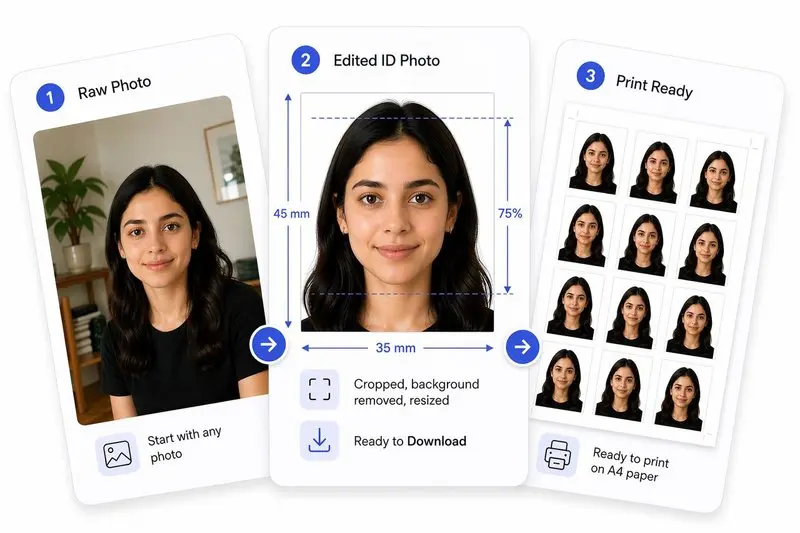
3টি ধাপে আপনার ছবি প্রস্তুত করুন
আপনার ছবি আপলোড করুন
যেকোনো ছবি আপলোড করুন — আমরা স্বয়ংক্রিয়ভাবে আপনার মুখ শনাক্ত করব।
এক ট্যাপে সামঞ্জস্য করুন (অথবা নিজে ঠিক করুন)
দ্রুত কেন্দ্রীভূত, সারিবদ্ধ, ক্রপ এবং ব্যাকগ্রাউন্ড পরিষ্কার করতে Auto Ready ব্যবহার করুন। নিজে নিয়ন্ত্রণ করতে চান? যেকোনো সময় সব কিছু নিজে সামঞ্জস্য করুন।
ডাউনলোড করুন এবং যেকোনো জায়গায় ব্যবহার করুন
অনলাইন ব্যবহারের জন্য ছবি ডাউনলোড করুন, বা সহজ প্রিন্টের জন্য একটি শিটে সাজান।
একটি ছবির মাপ বেছে নিন — আপনার নথির ধরন (যেমন মার্কিন পাসপোর্ট, শেনজেন ভিসা) নির্বাচন করুন অথবা কাস্টম মাপ লিখুন।
একটি ছবি আপলোড করুন — আপনার ডিভাইস থেকে ছবি টেনে আনুন অথবা ক্লিক করে নির্বাচন করুন।
মুখ শনাক্ত হলে টুলবারে অটো রেডি বাটনটি দেখা যাবে। আপনার মুখ স্বয়ংক্রিয়ভাবে কেন্দ্রে আনতে, চোখের রেখা বরাবর সোজা করতে, ক্রপ প্রয়োগ করতে এবং ব্যাকগ্রাউন্ড সরাতে এটিতে ট্যাপ করুন — সবই এক ট্যাপে।
OR, ক্রপ ঠিক করুন — ছবি টেনে পজিশন করুন, অটো-পজিশনের জন্য মুখ কেন্দ্রে আনুন ব্যবহার করুন, চোখের রেখা অনুযায়ী সোজা করতে সোজা করুন ব্যবহার করুন এবং প্রয়োগ করুন ক্লিক করুন। আপনি গ্যাপ পূরণের জন্য পটভূমি বাড়ান এবং প্রয়োগের পর ব্যাকগ্রাউন্ড সরান ব্যবহার করতে পারেন।
ফটো বিশ্লেষণ প্যানেলটি দেখুন — এটি আপনার চোখ খোলা আছে কি না, মুখের ভাব স্বাভাবিক কি না এবং মাথা সোজা আছে কি না তা দেখায়, সাথে যেকোনো সমস্যা সমাধানের টিপসও দেয়।
(ঐচ্ছিক) ব্যাকগ্রাউন্ডের রঙ পরিবর্তন করুন — ব্যাকগ্রাউন্ড সরানোর পর যেকোনো রঙ বেছে নিন অথবা অফিসিয়াল নথির জন্য সাদা রাখুন।
(ঐচ্ছিক) ফাইলের আকার এবং ফরম্যাট — একটি নির্দিষ্ট ফাইলের আকার লক্ষ্য করুন অথবা JPEG, PNG, বা WebP আউটপুট বেছে নিন।
আপনার ছবি ডাউনলোড করুন — অথবা প্রিন্ট করার জন্য A4 বা লেটার পেপারে কপিগুলো সাজাতে প্রিন্ট লেআউট ব্যবহার করুন।
একটি ফ্রি টুল যা অফিসিয়াল পাসপোর্ট, ভিসা এবং আইডি মাপ অনুযায়ী ছবি ক্রপ, রিসাইজ এবং কম্প্রেস করে। কোনো ডেটা আপলোড হয় না — সব কিছু আপনার ডিভাইসেই প্রসেস হয়।
হ্যাঁ, কোনো লুকানো খরচ, জলছাপ (watermark) বা সাইন-আপ ছাড়াই সম্পূর্ণ বিনামূল্যে।
না। আপনার ছবিগুলো পুরোপুরি আপনার ডিভাইসে প্রসেস হয় এবং কখনই ডিভাইস থেকে কোথাও যায় না।
ছবিতে মুখ শনাক্ত হলে এডিটর টুলবারে অটো রেডি বাটনটি দেখা যায়। এক-ধাপে প্রসেসিংয়ের জন্য এটিতে ট্যাপ করুন — মুখ কেন্দ্রে আনা, চোখের রেখা অনুযায়ী সোজা করা, ক্রপ করা এবং ব্যাকগ্রাউন্ড সরানো, সবই স্বয়ংক্রিয়ভাবে হবে। আপনি প্রতিটি ধাপ রিয়েল-টাইমে সম্পন্ন হতে দেখতে পাবেন।
হ্যাঁ। এই টুলে AI-চালিত ব্যাকগ্রাউন্ড রিমুভাল সুবিধা আছে যা আপনার ডিভাইসেই কাজ করে। আপনি ব্যাকগ্রাউন্ড সাদা বা যেকোনো রঙ দিয়ে পরিবর্তন করতে পারেন।
"কাস্টম সাইজ" বেছে নিন এবং মিলিমিটার, সেন্টিমিটার, ইঞ্চি বা পিক্সেল অনুযায়ী আপনার প্রয়োজনীয় প্রস্থ, উচ্চতা এবং DPI লিখুন।
অবশ্যই। শুধু আপনার ফোনের গ্যালারি থেকে ছবি আপলোড করুন। টুলটি প্রয়োজনীয় সঠিক মাপ অনুযায়ী ক্রপিং এবং রিসাইজিং সম্পন্ন করবে।
সিম্পল মোডে একটি হালকা ওজনের AI মডেল (~1 MB) ব্যবহার করা হয় যা যেকোনো ডিভাইসে (পুরনো মোবাইল ফোন সহ) প্রায় তাৎক্ষণিকভাবে চলে। এটি সোজা ও পরিষ্কার প্রান্তযুক্ত ছবির জন্য চমৎকার। হাই কোয়ালিটি মোডে একটি বড় ও উন্নত AI মডেল (~26 MB) ব্যবহার করা হয় যা চুলের সূক্ষ্ম অংশের মতো নিখুঁত বিবরণ ক্যাপচার করতে পারে এবং জটিল বা অগোছালো ব্যাকগ্রাউন্ড অনেক ভালোভাবে দূর করতে পারে। এটি প্রসেস হতে কিছুটা বেশি সময় নেয়।
আপনার ছবিতে যদি উড়ন্ত চুল থাকে, ব্যাকগ্রাউন্ডে জটিল প্যাটার্ন থাকে বা প্রফেশনাল মানের নিখুঁত প্রান্তের প্রয়োজন হয়, তবে হাই কোয়ালিটি (ডিফল্ট) ব্যবহার করুন। আপনি যদি কোনো পুরনো মোবাইল ডিভাইস ব্যবহার করেন যাতে মেমরির সমস্যা হতে পারে, আপনার ইন্টারনেট কানেকশন ধীরগতির হয় (যেহেতু এটিতে বড় মডেল ডাউনলোডের প্রয়োজন নেই), অথবা আপনি চশমা/হেডগিয়ার পরে থাকেন যেখানে সোজা ও জ্যামিতিক পরিষ্কার প্রান্তের প্রয়োজন হয়, তবে সিম্পল মোড বেছে নিন।
আপনি এডিটর ক্যানভাসের নিচে ডান কোণায় (ফেস মার্কার বাটনের ঠিক ওপরে) অথবা ব্যাকগ্রাউন্ড রিমুভাল কার্ডের ভেতরে থাকা ভাসমান (floating) ইমেজ আইকন বাটনটি ব্যবহার করে এই দুই মোডের মধ্যে পরিবর্তন করতে পারেন। বাটনটিতে ক্লিক করলে মোড পরিবর্তিত হবে এবং স্ক্রিনে একটি সংক্ষিপ্ত নোটিফিকেশন (যেমন: 'উচ্চ মানের ব্যাকগ্রাউন্ড রিমুভাল সক্রিয়' বা 'সহজ ব্যাকগ্রাউন্ড রিমুভাল সক্রিয়') দেখাবে।
ডিভাইসের মেমরির সীমাবদ্ধতা বা ব্রাউজারের সমস্যার কারণে যদি হাই কোয়ালিটি মোডটি ব্যর্থ হয়, তবে টুলটি স্বয়ংক্রিয়ভাবে সিম্পল মোডে চলে যাবে। এর ফলে কোনো ধরনের বাধা ছাড়াই আপনি ব্যাকগ্রাউন্ড সরানো ছবি পেয়ে যাবেন।
Browse ID Photo Size Guides
View all toolsSelect your country or use case — the tool will pre-load the correct dimensions automatically.
Passport Photos by Country
US Passport Photo
2×2 inch (51×51 mm)
UK Passport Photo
35×45 mm
India Passport Photo
35×45 mm
Canada Passport Photo
50×70 mm
Australia Passport Photo
35×45 mm
UAE Passport Photo
40×60 mm
Germany Passport Photo
35×45 mm
France Passport Photo
35×45 mm
Japan Passport Photo
35×45 mm
South Korea Passport Photo
35×45 mm
Singapore Passport Photo
400×514 px (ICA)
Pakistan Passport Photo
35×45 mm