
IDPhotoSize
محرر صور الهوية الرسمي — مجاني، فوري وخاص. صورتك لا تغادر جهازك أبدًا.
Give your photo the identity it deserves!
Compress Your Photo to Under 100KB
University admission portals, state Passport Seva Kendra digital submissions, and many European consulate visa portals cap photo files at 100KB. This tool compresses your photo to under 100KB while preserving as much quality as possible — all processing happens on your device.
فوريمجاني — بدون علامة مائية100% خاصصورتك تبقى على جهازكبدون حسابمقاسات رسمية
أسقط صورتك هنا
أو انقر للتصفح — JPG، PNG، WEBP
صورتك تبقى على جهازك
أو جرّب صورة نموذجية:
Related Tools
Photo Requirements
- Output file size: under 100KB
- Format: JPEG recommended
- Works with any photo — passport, ID, or portrait
- Common portals: Indian university admissions (DU, JNU, NEET-UG), state Passport Seva portals, European consulate visa uploads, corporate job application portals
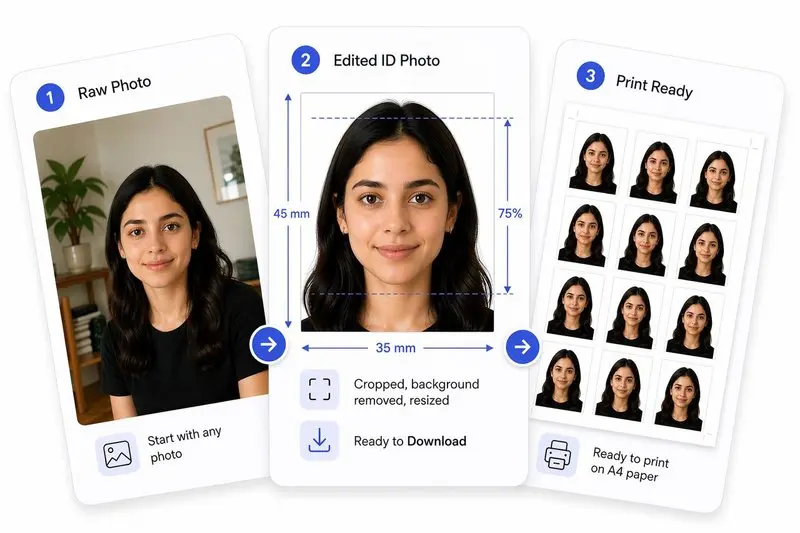
صورتك، مكتملة بشكل صحيح
جهّز صورتك في 2 خطوات
ارفع صورتك
ارفع أي صورة — سنكشف وجهك تلقائياً.
اضغط الملف وحمّل
حدد الحجم المستهدف (مثل 50 KB) وحمّل الصورة المضغوطة فوراً.
How to Use This Tool
- Upload your photo (JPG, PNG, or WEBP).
- The tool automatically targets 100KB output.
- Optionally crop or resize to required dimensions first.
- Click Apply, then Download.
Frequently Asked Questions
- Which portals require photos under 100KB?
- Indian university admissions (Delhi University, JNU, NEET-UG online applications), state-level Passport Seva Kendra digital submissions, many European consulate visa upload portals, and mid-tier corporate HR portals commonly cap photo uploads at 100KB.
- What is the quality difference between a 50KB and a 100KB photo?
- For a standard 35×45mm ID photo at 300 DPI (413×531 px), a 100KB JPEG is at roughly 75–80% quality — visually clean. A 50KB version is at roughly 55–65% — noticeably softer but still acceptable for document submission. Choose 100KB whenever the portal allows it.
- Can I compress without changing the photo dimensions?
- Yes. Upload your photo at its original dimensions and the tool applies only JPEG quality reduction to reach 100KB. If the photo is very large (e.g. 4000×3000 px from a phone camera), resizing to passport dimensions first, then compressing, produces a better-looking result at 100KB.
- Is this free?
- Completely free. Nothing leaves your device.
Need a different size or country?
Open the Full ID Photo Tool — 30+ Sizes