
IDPhotoSize
محرر صور الهوية الرسمي — مجاني، فوري وخاص. صورتك لا تغادر جهازك أبدًا.
Give your photo the identity it deserves!
Remove Background from Your Photo
Upload any photo and the background is removed automatically — free, instant, and completely private. The AI model runs entirely on your device. Nothing is ever uploaded to a server. Download as a transparent PNG or pick a custom background color.
مقاسات رسميةتحليل الصورة100% خاصفوريصورتك تبقى على جهازكمجاني — بدون علامة مائيةبدون حساب
أسقط صورتك هنا
أو انقر للتصفح — JPG، PNG، WEBP
صورتك تبقى على جهازك
أو جرّب صورة نموذجية:
Related Tools
Tips for Best Results
- Works best with a clear subject on a contrasting background
- Supported upload formats: JPEG, PNG, WebP
- Good front-facing lighting improves accuracy
- Output is always a PNG — supports full transparency
- Use the color picker after removal to set a solid background color
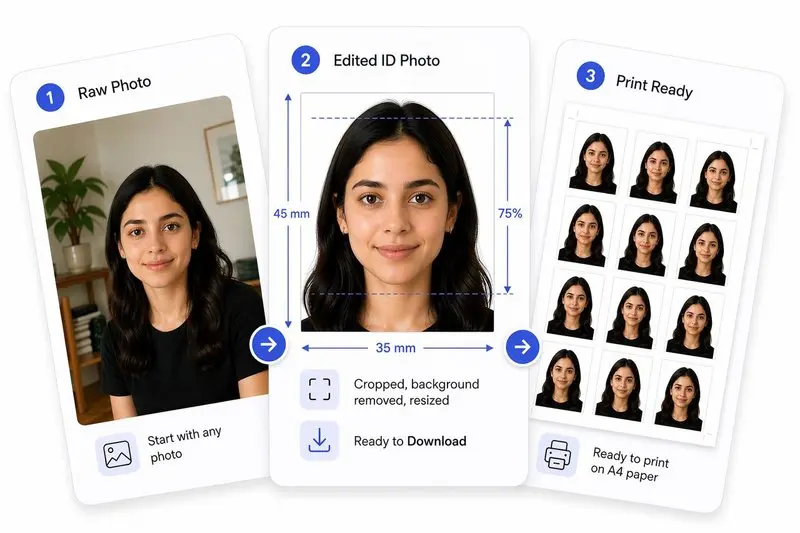
صورتك، مكتملة بشكل صحيح
جهّز صورتك في 2 خطوات
ارفع صورتك
ارفع أي صورة — سنكشف وجهك تلقائياً.
إزالة الخلفية والتحميل
تتم إزالة الخلفية كلياً على جهازك — لا يُرفع شيء. اختر لوناً بديلاً أو احتفظ بالشفافية، ثم حمّل.
How to Use This Tool
- Upload your photo using the button above.
- Background removal starts automatically — wait about 15–30 seconds on first use.
- Use the color picker to set a background color, or keep it transparent.
- Download your photo as a PNG file.
Frequently Asked Questions
- Is this free?
- Yes, completely free. No sign-up, no watermarks, no limits.
- Does anyone see my photo?
- No. Your photo never leaves your device. Nothing is sent anywhere.
- How long does it take?
- Usually around 15–30 seconds. The very first time you use it may take a little longer as the tool gets set up.
- Can I change the background color?
- Yes. Once the background is removed, use the color picker to choose any color — or keep it transparent.
- How can I get an image with a transparent background?
- To keep the background transparent, download as PNG. If you pick a background color instead, any format works.
Also need to resize or crop for a passport or ID?
Open the Full ID Photo Tool — 30+ Sizes