
IDPhotoSize
محرر صور الهوية الرسمي — مجاني، فوري وخاص. صورتك لا تغادر جهازك أبدًا.
Give your photo the identity it deserves!
Make Your Philippines Passport Photo the Right Size
Philippine passport photos must be 35×45mm with a plain white background, as required by the Department of Foreign Affairs (DFA). This free tool crops and resizes your photo to meet DFA biometric requirements — entirely on your device.
اختر حجم الصورة
35×45 مم، خلفية بيضاء (DFA)
أسقط صورتك هنا
أو انقر للتصفح — JPG، PNG، WEBP
صورتك تبقى على جهازك
Related Tools
Photo Requirements
- Size: 35×45mm (413×531 px at 300 DPI)
- Resolution: 300 DPI minimum
- Background: plain white
- Full face, neutral expression, eyes open and looking at the camera
- Photo taken within the last 6 months
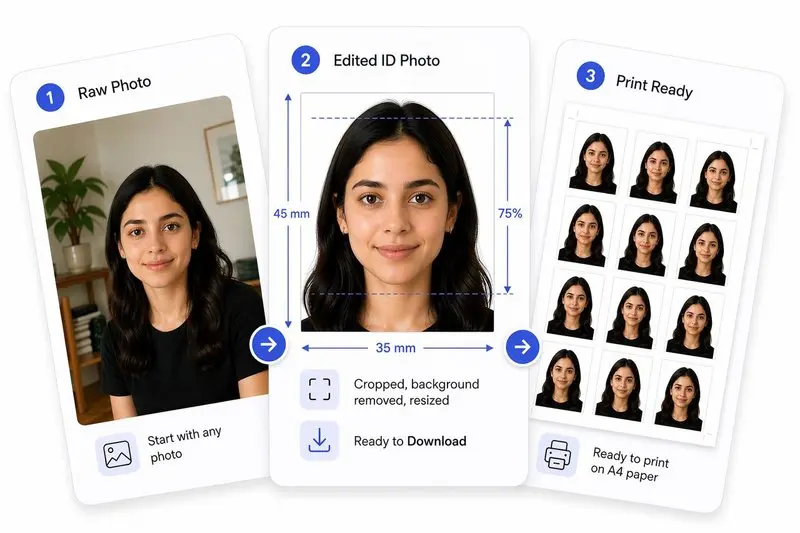
صورتك، مكتملة بشكل صحيح
جهّز صورتك في 3 خطوات
ارفع صورتك
ارفع أي صورة — سنكشف وجهك تلقائياً.
اضبط بنقرة واحدة (أو بتحكم كامل)
استخدم Auto Ready لتوسيط الوجه وتسويته واقتصاصه وتنظيف الخلفية بسرعة. تفضل التحكم بنفسك؟ اضبط كل شيء بحرية في أي وقت.
حمّل واستخدم في أي مكان
حمّل صورتك للاستخدام الرقمي، أو رتّبها على ورقة للطباعة بسهولة.
How to Use This Tool
- Upload a front-facing photo with good lighting.
- Zoom and move in until the face oval guide aligns with your face.
- Click Center Face to auto-position the crop, then Straighten to level your eyes.
- Make final adjustments — drag the image and fine-tune the tilt if needed.
- Click Apply, then optionally Remove Background for a clean white backdrop.
- Review the Photo Analysis panel to check DFA compliance — it shows eye status, expression neutrality, and head tilt, with hints for any corrections.
- Download your DFA-ready photo.
Frequently Asked Questions
- What size is a Philippines passport photo?
- Philippine passport photos must be 35mm wide by 45mm tall with a white background, as required by the DFA.
- Can I use this for a Philippine visa application?
- Yes. Most Philippine visa applications use the same 35×45mm format.
- Can OFWs use this tool for their photos?
- Yes. Overseas Filipino Workers (OFWs) applying for passport renewal or government IDs can use this tool to prepare their photos.
- Can OFWs use this photo for DFA consular applications abroad?
- Yes. DFA consular offices and OFW processing centres require the standard 35×45mm white background photo. OFWs can prepare their photo here before visiting the nearest Philippine embassy or consulate.
- Does the DFA accept digital photo uploads for passport renewal?
- The DFA online appointment system does not currently accept digital photo uploads — physical prints are required at the appointment. However, preparing the correct size here ensures the right dimensions when printing.
- What is the pixel size of a Philippines passport photo?
- A Philippines passport photo at 300 DPI is 413×531 pixels (35×45mm). The DFA requires a plain white background with the full face visible.
Need a different size or country?
Open the Full ID Photo Tool — 30+ Sizes