
IDPhotoSize
محرر صور الهوية الرسمي — مجاني، فوري وخاص. صورتك لا تغادر جهازك أبدًا.
Give your photo the identity it deserves!
Resize Your Signature for Online Applications
Many job portals and government application forms require a scanned signature in specific dimensions and under a file size limit. Upload your signature image, remove the paper background in one click, and download a clean, correctly sized JPEG — all on your device.
اختر حجم الصورة
8×3 سم، حجم توقيع المستندات القياسي
أسقط صورتك هنا
أو انقر للتصفح — JPG، PNG، WEBP
صورتك تبقى على جهازك
Related Tools
Photo Requirements
- Dimensions: 80×30mm (8×3cm) at 200 DPI — equals 630×236 px
- File size: typically under 50KB (check your portal)
- Format: JPEG
- White background, no shadows
- Signature must be fully visible and legible within the frame
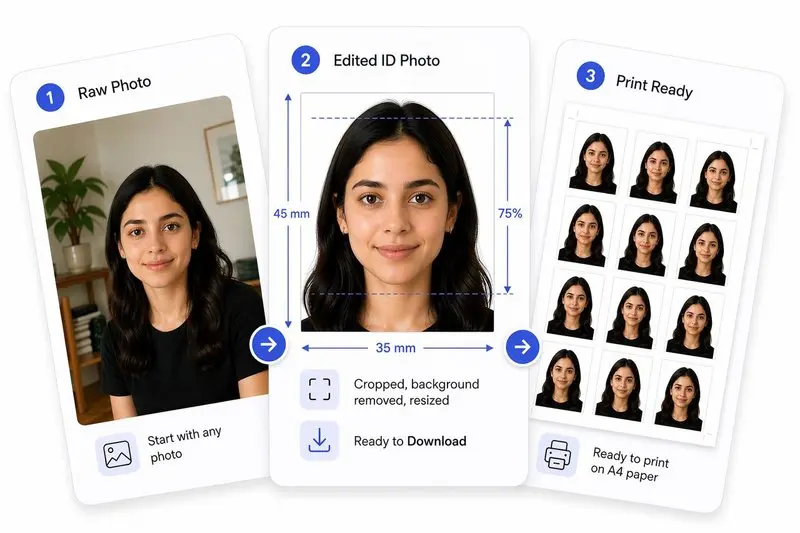
صورتك، مكتملة بشكل صحيح
جهّز صورتك في 3 خطوات
ارفع صورتك
ارفع أي صورة — سنكشف وجهك تلقائياً.
اضبط بنقرة واحدة (أو بتحكم كامل)
استخدم Auto Ready لتوسيط الوجه وتسويته واقتصاصه وتنظيف الخلفية بسرعة. تفضل التحكم بنفسك؟ اضبط كل شيء بحرية في أي وقت.
حمّل واستخدم في أي مكان
حمّل صورتك للاستخدام الرقمي، أو رتّبها على ورقة للطباعة بسهولة.
How to Use This Tool
- Sign clearly on plain white paper using black or dark blue ink.
- Photograph in good natural light — avoid shadows falling across the ink — or use a flatbed scanner.
- Upload the image here.
- Drag the crop handles so the signature fills most of the frame with a small even margin on each side.
- Click Remove Background — the tool detects the ink automatically and replaces the paper colour with clean white, correcting uneven lighting and yellowed paper.
- Click Apply — the image is resized to 80×30mm at 200 DPI and compressed to meet the target file size.
- Download the ready-to-upload signature JPEG.
Frequently Asked Questions
- What size should my signature be for an online application?
- Requirements vary by portal. The most common general format is 80×30mm (8×3cm). Indian government portals (SSC, UPSC, Railways, Banking) typically require 3.5×1.5cm. Always check your specific portal’s instructions before uploading.
- How do I photograph or scan my signature?
- Sign on plain white A4 paper with a black or dark-blue pen. Place the paper flat and photograph from directly above in bright, even light — avoid angling the camera, which causes shadows. A flatbed scanner gives the cleanest result. Upload the full-page photo; the crop tool handles the rest.
- How does background removal work for signatures?
- The tool uses an adaptive contrast algorithm designed for ink on paper. It analyses each pixel’s brightness relative to its local surroundings, keeps ink pixels, and replaces the paper background — including uneven shadows or a yellowish tint — with clean white. No deep-learning model is used, so it runs instantly even on a slow connection.
- My scan has yellow paper or uneven shadows — will background removal fix it?
- Yes. The adaptive approach compares each pixel to its neighbours rather than using a fixed white threshold, so it handles off-white, cream, or unevenly lit paper well. Most phone photos of a signature come out clean after one click.
- Should the background be white or transparent?
- Almost all government and job portals expect a JPEG with a white background. Transparent backgrounds require PNG format, which most portals do not accept for signatures. Use Remove Background and keep the output as JPEG with white fill.
- What if my portal requires a different dimension?
- Select the custom size option before applying. Enter the exact width and height your portal specifies (in mm, cm, or px), set the file size limit, and click Apply.
- What pixel dimensions is 80×30mm at 200 DPI?
- At 200 DPI, 80mm = 630 px and 30mm = 236 px, giving a final image of 630×236 pixels. The tool sets this automatically when you use the General Signature preset.
- Is this free?
- Completely free, no account needed. Your image is processed entirely on your device and is never uploaded to any server.
Need a different size or country?
Open the Full ID Photo Tool — 30+ Sizes