
IDPhotoSize
محرر صور الهوية الرسمي — مجاني، فوري وخاص. صورتك لا تغادر جهازك أبدًا.
Give your photo the identity it deserves!
Resize Your Signature to 3.5×1.5cm for Applications
Indian government job portals — SSC, UPSC, IBPS, SBI, Railways, and most state PSCs — require a scanned signature of exactly 3.5×1.5cm (35×15mm) under 20–30KB. This tool resizes, removes the paper background, and compresses your signature in one step, entirely on your device.
اختر حجم الصورة
3.5×1.5 سم (35×15 مم)، المعيار لبوابات طلبات التوظيف الحكومية
أسقط صورتك هنا
أو انقر للتصفح — JPG، PNG، WEBP
صورتك تبقى على جهازك
Related Tools
Photo Requirements
- Size: 3.5cm × 1.5cm (35×15mm) — 276×118 px at 200 DPI
- File size: under 20KB (SSC, Railways) or 30KB (UPSC, IBPS, SBI) — check your portal
- Format: JPEG
- White background, no shadows or paper colour showing
- Full signature clearly visible within the frame, not clipped at any edge
- Use black or dark blue ink on plain white paper
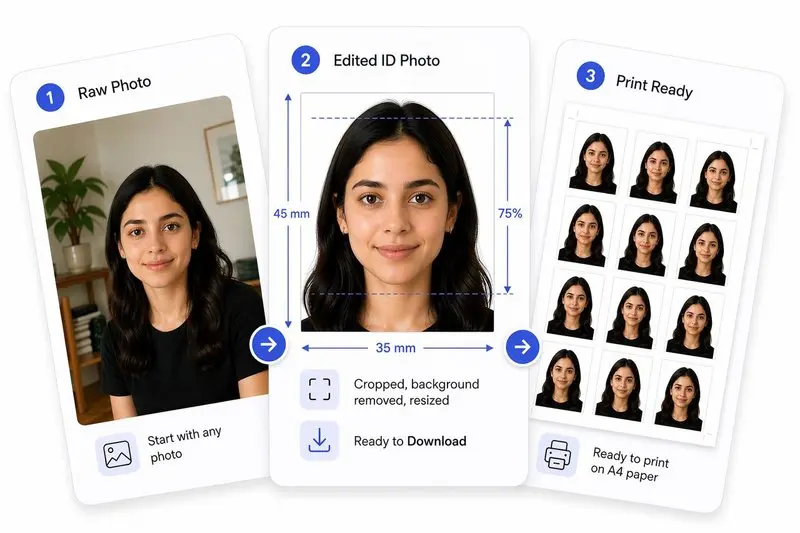
صورتك، مكتملة بشكل صحيح
جهّز صورتك في 3 خطوات
ارفع صورتك
ارفع أي صورة — سنكشف وجهك تلقائياً.
اضبط بنقرة واحدة (أو بتحكم كامل)
استخدم Auto Ready لتوسيط الوجه وتسويته واقتصاصه وتنظيف الخلفية بسرعة. تفضل التحكم بنفسك؟ اضبط كل شيء بحرية في أي وقت.
حمّل واستخدم في أي مكان
حمّل صورتك للاستخدام الرقمي، أو رتّبها على ورقة للطباعة بسهولة.
How to Use This Tool
- Sign on a clean sheet of plain white paper using black or dark blue ink.
- Photograph the signature in bright, even light with the phone held directly above, or use a flatbed scanner.
- Upload the image here.
- Drag the crop handles so the entire signature is visible with a small equal margin on all sides — do not clip the tips of letters.
- Click Remove Background — the tool replaces the paper colour (including any yellowed or shadowed areas) with clean white.
- Click Apply — the image is resized to exactly 35×15mm (276×118 px at 200 DPI) and compressed to meet your portal’s file size limit.
- Download the JPEG and upload it to your application portal.
Frequently Asked Questions
- What is the standard signature size for Indian government applications?
- 3.5cm wide by 1.5cm tall (35×15mm). At 200 DPI this equals 276×118 pixels. The file must be JPEG and typically under 20–30KB depending on the portal.
- Which portals require this 3.5×1.5cm signature size?
- SSC CGL / CHSL / MTS, UPSC Civil Services and CDS, IBPS PO / Clerk / SO, SBI PO and Clerk, Railway Recruitment Board (RRB / RRC), and most state Public Service Commissions all use this standard. A few portals accept a slightly larger size — always verify the official notification.
- SSC requires under 20KB but my file is still too large — what do I do?
- After clicking Apply, use the file size slider to set the target to 20KB. The tool applies the minimum JPEG compression needed to reach that limit. If the result looks blurry, try cropping tighter around the signature before applying so fewer background pixels are included.
- How does the background removal work?
- The tool uses an ink-detection algorithm that compares each pixel to its local surroundings. Ink pixels (dark relative to nearby paper) are kept; background pixels are replaced with white. It handles uneven lighting, yellowish paper, and phone-camera shadows without any manual selection.
- My phone photo has a greyish or yellowish background — will it come out white?
- Yes. The adaptive background removal is designed for exactly this case. It does not rely on a fixed colour threshold, so off-white, cream, or unevenly lit paper is cleaned to pure white. Most phone-shot signature photos produce a clean result in one click.
- Can I use a coloured pen (blue ink) for the signature?
- Black ink scans with the highest contrast and gives the cleanest background removal result. Dark blue is also fine. Avoid light colours like red, orange, or pencil — these have lower contrast against white paper and may not separate cleanly.
- What if my portal requires a different size or file limit?
- Use the custom size fields to enter your portal’s exact dimensions, then adjust the file size target to match. The tool is not limited to the preset 3.5×1.5cm size.
- Is this free?
- Completely free, no sign-up required. The entire process — resizing, background removal, and compression — runs on your device. Your signature image is never sent to any server.
Need a different size or country?
Open the Full ID Photo Tool — 30+ Sizes