
IDPhotoSize
محرر صور الهوية الرسمي — مجاني، فوري وخاص. صورتك لا تغادر جهازك أبدًا.
Give your photo the identity it deserves!
اختر حجم الصورة
أسقط صورتك هنا
أو انقر للتصفح — JPG، PNG، WEBP
صورتك تبقى على جهازك
100% خاص
لا رفع — كل شيء يعمل على جهازك
30+ حجماً للصور
جوازات وتأشيرات: الولايات المتحدة، بريطانيا، كندا، الهند، سنغافورة والمزيد
توسيط ذكي للوجه
يكتشف وجهك تلقائياً ويضعه في المنتصف للحصول على صورة محاذاة تماماً
تحليل ذكي للصورة
يفحص العيون والتعبير ووضع الرأس — مع تلميحات لتصحيح أي مشكلة قبل التقديم
إزالة ذكية للخلفية
أزل الخلفية واستبدلها على جهازك مباشرة
تخطيط جاهز للطباعة
رتّب نسخاً على A4 أو Letter للطباعة
مناسب لأي حد رفع
قلّل حجم الملف من 20 KB إلى 2 MB — يناسب أي بوابة إلكترونية
بدون تسجيل
لا حساب، لا بريد إلكتروني — افتح واستخدم مباشرة
نتائج فورية
صورتك جاهزة في ثوانٍ — جميع المعالجة تتم على جهازك
صورتك، مكتملة بشكل صحيح
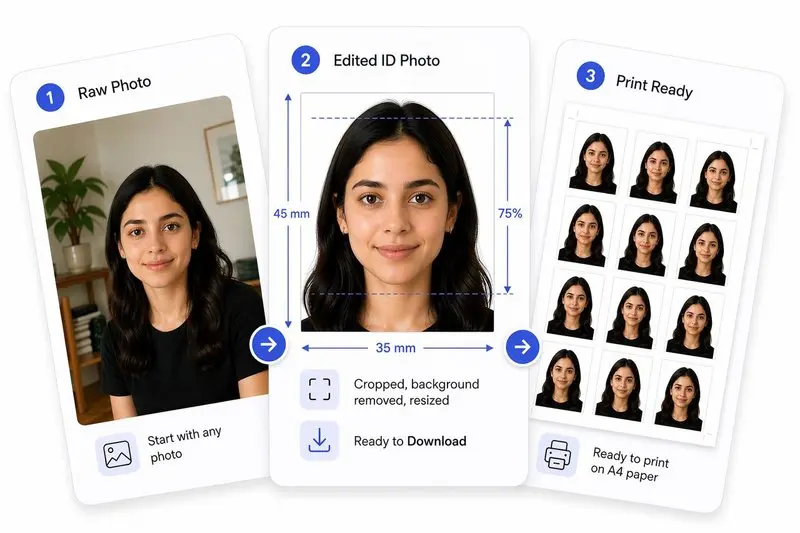
جهّز صورتك في 3 خطوات
ارفع صورتك
ارفع أي صورة — سنكشف وجهك تلقائياً.
اضبط بنقرة واحدة (أو بتحكم كامل)
استخدم Auto Ready لتوسيط الوجه وتسويته واقتصاصه وتنظيف الخلفية بسرعة. تفضل التحكم بنفسك؟ اضبط كل شيء بحرية في أي وقت.
حمّل واستخدم في أي مكان
حمّل صورتك للاستخدام الرقمي، أو رتّبها على ورقة للطباعة بسهولة.
اختر حجم الصورة — حدد نوع مستندك (مثل جواز سفر أمريكي، تأشيرة شنغن) أو أدخل أبعادًا مخصصة.
ارفع صورة — قم بسحب وإسقاط الصورة أو النقر لاختيارها من جهازك.
يظهر زر جاهز تلقائياً في شريط الأدوات بمجرد اكتشاف الوجه. اضغط عليه لتوسيط وجهك تلقائيًا، ومحاذاته مع خط العين، وتطبيق الاقتصاص، وإزالة الخلفية — كل ذلك بنقرة واحدة.
OR, ضبط الاقتصاص — اسحب وحرك الصورة، استخدم توسيط الوجه للتموضع التلقائي، تصحيح الميل للمحاذاة مع خط عينك، وانقر فوق تطبيق. يمكنك أيضًا استخدام توسيع الخلفية لملء أي فجوات، وإزالة الخلفية بعد التطبيق.
تحقق من لوحة تحليل الصورة — فهي توضح ما إذا كانت عيناك مفتوحتين، والتعبير محايدًا، والرأس مستقيمًا، مع تلميحات لتصحيح أي مشكلة.
(اختياري) تغيير لون الخلفية — بعد إزالة الخلفية، اختر أي لون أو ابقها بيضاء للمستندات الرسمية.
(اختياري) حجم الملف وتنسيقه — حدد حجم ملف مستهدف أو اختر إخراج JPEG أو PNG أو WebP.
حمّل صورتك — أو استخدم تخطيط الطباعة لترتيب النسخ على ورق A4 أو Letter للطباعة.
أداة مجانية تقوم باقتصاص الصور وتغيير حجمها وضغطها لتناسب الأبعاد الرسمية لجواز السفر والتأشيرة والهوية. لا يتم رفع أي بيانات — كل شيء يعمل على جهازك.
نعم، مجاني تمامًا بدون أي تكاليف خفية أو علامات مائية أو تسجيل.
لا. تتم معالجة صورك بالكامل على جهازك ولا تغادره أبدًا.
يظهر زر جاهز تلقائياً في شريط أدوات المحرر بمجرد اكتشاف وجه في صورتك. اضغط عليه للحصول على معالجة بخطوة واحدة — توسيط الوجه، المحاذاة مع خط العين، الاقتصاص، وإزالة الخلفية، كل ذلك تلقائيًا. يمكنك مشاهدة كل خطوة تكتمل في الوقت الفعلي.
نعم. تتضمن الأداة ميزة إزالة الخلفية المدعومة بالذكاء الاصطناعي والتي تعمل على جهازك. يمكنك استبدال الخلفية باللون الأبيض أو أي لون آخر.
اختر "حجم مخصص" وأدخل قيم العرض والارتفاع وDPI الخاصة بك بالمليمتر أو السنتيمتر أو البوصة أو البكسل.
بالتأكيد. ما عليك سوى رفع الصورة من معرض هاتفك. تتولى الأداة الاقتصاص وتغيير الحجم وفقًا للأبعاد الدقيقة المطلوبة.
يستخدم الوضع البسيط (Simple Mode) نموذج ذكاء اصطناعي خفيف الحجم (~1 ميجابايت) يعمل بشكل فوري تقريباً على أي جهاز (بما في ذلك الهواتف المحمولة القديمة). وهو ممتاز للحواف النظيفة والصور الواضحة. أما وضع الجودة العالية (High Quality Mode) فيستخدم نموذجاً متقدماً وأكبر حجماً (~26 ميجابايت) لالتقاط التفاصيل الدقيقة مثل خصلات الشعر الفردية ويتعامل مع الخلفيات المعقدة أو المزدحمة بشكل أفضل بكثير. يستغرق وقتاً أطول قليلاً في المعالجة.
استخدم الجودة العالية (الافتراضية) إذا كانت صورتك تحتوي على شعر متطاير، أو أنماط معقدة في الخلفية، أو إذا كنت بحاجة إلى حواف احترافية للغاية. استخدم الوضع البسيط إذا كنت تستخدم هاتفاً محمولاً قديماً يواجه مشاكل في الذاكرة، أو إذا كان اتصال الإنترنت لديك بطيئاً (لأنه لا يحتاج إلى تنزيل النموذج الأكبر)، أو إذا كنت ترتدي غطاء رأس/نظارات حيث يُفضل وجود حواف هندسية حادة ونظيفة.
يمكنك التبديل بينهما باستخدام زر أيقونة الصورة العائم الموجود في الزاوية اليمنى السفلية من لوحة المحرر (فوق زر علامات الوجه مباشرةً) أو داخل بطاقة إزالة الخلفية. سيؤدي النقر على الزر إلى تبديل الأوضاع وظهور إشعار قصير على الشاشة (مثل "تم تفعيل إزالة الخلفية عالية الجودة" أو "تم تفعيل إزالة الخلفية البسيطة") لتأكيد التغيير.
إذا فشل وضع الجودة العالية بسبب قيود ذاكرة الجهاز أو قيود المتصفح، فستنتقل الأداة تلقائياً إلى الوضع البسيط، مما يضمن حصولك على صورة خالية من الخلفية دون أي انقطاع.
Browse ID Photo Size Guides
View all toolsSelect your country or use case — the tool will pre-load the correct dimensions automatically.
Passport Photos by Country
US Passport Photo
2×2 inch (51×51 mm)
UK Passport Photo
35×45 mm
India Passport Photo
35×45 mm
Canada Passport Photo
50×70 mm
Australia Passport Photo
35×45 mm
UAE Passport Photo
40×60 mm
Germany Passport Photo
35×45 mm
France Passport Photo
35×45 mm
Japan Passport Photo
35×45 mm
South Korea Passport Photo
35×45 mm
Singapore Passport Photo
400×514 px (ICA)
Pakistan Passport Photo
35×45 mm