
IDPhotoSize
محرر صور الهوية الرسمي — مجاني، فوري وخاص. صورتك لا تغادر جهازك أبدًا.
Give your photo the identity it deserves!
Compress Your Photo to Under 20KB
Some Indian state government portals, older railway recruitment systems (RRB), and signature upload fields enforce a 20KB hard limit — one of the strictest requirements in any government recruitment system. This tool compresses your photo to meet that limit on your device, applying the minimum quality reduction needed.
فوريمجاني — بدون علامة مائية100% خاصصورتك تبقى على جهازكبدون حسابمقاسات رسمية
أسقط صورتك هنا
أو انقر للتصفح — JPG، PNG، WEBP
صورتك تبقى على جهازك
أو جرّب صورة نموذجية:
Related Tools
Photo Requirements
- Output file size: under 20KB
- Format: JPEG (required for this compression level)
- Works best with small-dimension ID or passport photos
- Common portals: Indian Railways (RRB) older systems, some state PSC photo/signature fields, government kiosk upload interfaces
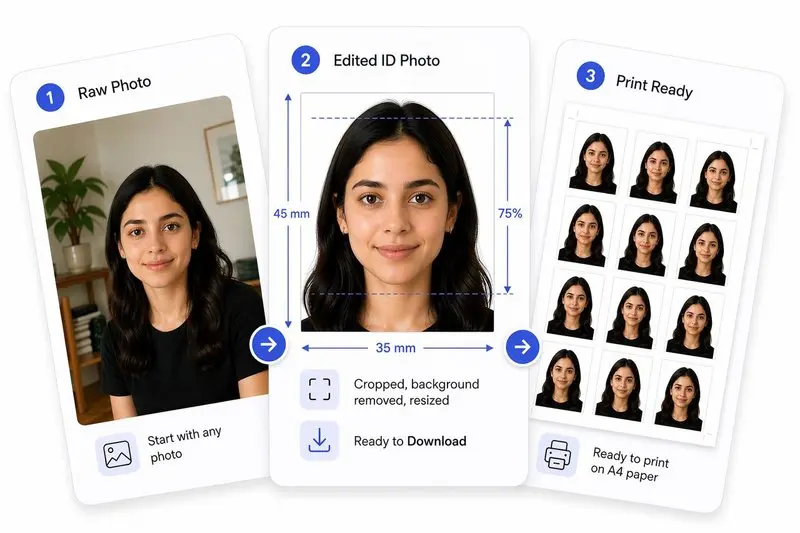
صورتك، مكتملة بشكل صحيح
جهّز صورتك في 2 خطوات
ارفع صورتك
ارفع أي صورة — سنكشف وجهك تلقائياً.
اضغط الملف وحمّل
حدد الحجم المستهدف (مثل 50 KB) وحمّل الصورة المضغوطة فوراً.
How to Use This Tool
- Upload your photo (JPG, PNG, or WEBP).
- The tool automatically targets 20KB output.
- Optionally crop to exact required dimensions first.
- Click Apply, then Download.
Frequently Asked Questions
- Which Indian government portals require photos under 20KB?
- Older Indian Railways (RRB) portals, some state Public Service Commission (PSC) systems, and certain government kiosk interfaces impose a 20KB cap. Many also use this limit for the scanned signature field. Always check the specific portal — many have updated to 50KB or 100KB.
- Is a 20KB photo still usable for identification?
- For a small-dimension ID photo (35×45mm at 150–200 DPI, roughly 250×320 px), 20KB is achievable at JPEG quality around 40–55%. The face is identifiable but fine skin texture is compressed. Reducing pixel dimensions before compressing produces cleaner results at this limit.
- What is the difference between reducing file size and reducing dimensions?
- Reducing dimensions (e.g. 413×531 px to 250×320 px) cuts raw pixel data and is the most effective path to 20KB. Reducing JPEG quality alone on a large-dimension image produces a blurry result at the same large size. Use both together for very small targets like 20KB.
- Is this free?
- Completely free. Your photo never leaves your device.
Need a different size or country?
Open the Full ID Photo Tool — 30+ Sizes