
IDPhotoSize
محرر صور الهوية الرسمي — مجاني، فوري وخاص. صورتك لا تغادر جهازك أبدًا.
Give your photo the identity it deserves!
Prepare Your Singapore Visa Photo Instantly
Singapore visa applications require a 35×45mm photo with a plain white background, per ICA guidelines. Use this free tool to crop, resize, and prepare your photo — everything runs on your device.
اختر حجم الصورة
mm
35×45 مم، خلفية بيضاء (ICA)
مقاسات رسميةتحليل الصورة100% خاصفوريصورتك تبقى على جهازكمجاني — بدون علامة مائيةبدون حساب
أسقط صورتك هنا
أو انقر للتصفح — JPG، PNG، WEBP
صورتك تبقى على جهازك
أو جرّب صورة نموذجية:
Related Tools
Photo Requirements
- Dimensions: 35mm × 45mm (printed), 400 × 514 pixels (digital)
- Background: Plain white with no shadows, patterns, or borders
- Expression: Neutral, mouth closed, eyes looking directly at the camera
- Head Position: Centered, facing forward, full head and shoulders visible
- Head Height: Chin to top of hair must be 32–36mm
- Attire: Dark clothing recommended for contrast against the white background
- Lighting: Evenly lit, no red-eye or glare
- Quality: High-quality, matte or semi-matte finish
- File Format: JPEG, no larger than 2 MB
- No selfies — poor lighting and angle are common issues
- Headdress: Religious or medical headgear allowed if the full face is visible
- Glasses: No glare on lenses; clear prescription glasses acceptable
- Photo taken within the last 3 months
المتطلبات الرسمية:
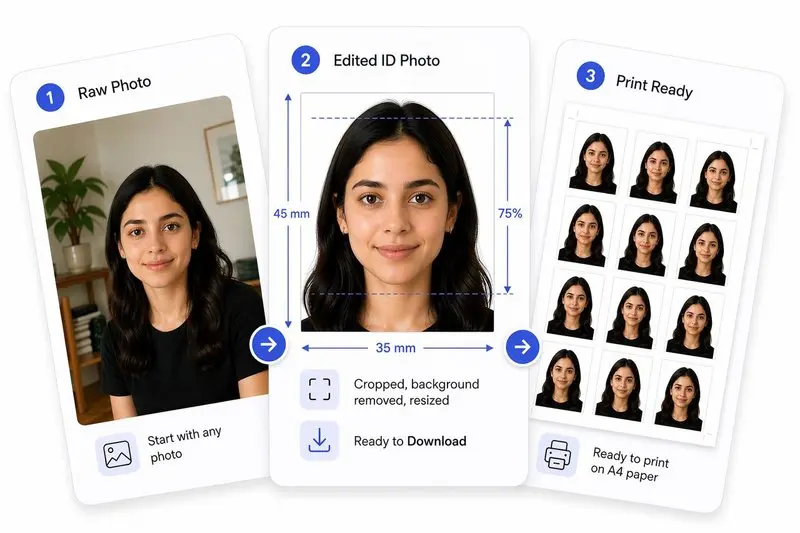
صورتك، مكتملة بشكل صحيح
جهّز صورتك في 3 خطوات
ارفع صورتك
ارفع أي صورة — سنكشف وجهك تلقائياً.
اضبط بنقرة واحدة (أو بتحكم كامل)
استخدم Auto Ready لتوسيط الوجه وتسويته واقتصاصه وتنظيف الخلفية بسرعة. تفضل التحكم بنفسك؟ اضبط كل شيء بحرية في أي وقت.
حمّل واستخدم في أي مكان
حمّل صورتك للاستخدام الرقمي، أو رتّبها على ورقة للطباعة بسهولة.
How to Use This Tool
- Upload a clear, front-facing photo.
- Zoom and move in until the face oval guide aligns with your face.
- Click Center Face to auto-center the crop, then Straighten to level your eyes.
- Make final adjustments — drag the image and fine-tune the tilt if needed.
- Click Apply, then optionally Remove Background for a clean white backdrop.
- Review the Photo Analysis panel to confirm your photo meets ICA visa standards — eyes open, neutral expression, head straight — with guided correction hints.
- Download your Singapore visa-ready photo.
Frequently Asked Questions
- What size is a Singapore visa photo?
- Singapore visa photos must be 35×45mm with a plain white background, matching the ICA passport photo standard.
- Is the Singapore visa photo the same size as the passport photo?
- Yes — both require 35×45mm with a white background.
- Can I take my own Singapore visa photo?
- Yes. Use a well-lit area with a plain white background, face the camera directly, and upload here to resize to the correct dimensions.
- Is this free?
- Completely free. Nothing leaves your device.
- Is the Singapore visa photo the same size as the passport photo?
- Yes. ICA requires the same 35×45mm plain white background photo for all visa and immigration applications, including the In-Principle Approval (IPA) and Re-Entry Permit (REP).
- What is the maximum file size for a Singapore visa photo upload?
- ICA digital submissions accept JPEG files up to 2MB. At 35×45mm and 300 DPI (413×531 px), the file from this tool is typically 60–120 KB — well within the limit.
Need a different size or country?
Open the Full ID Photo Tool — 30+ Sizes